




Maximizing Small Office Spaces: The Smart Guide to Printer & Storage Trolleys
Home offices, studio apartments, and compact corporate workspaces often share the same frustrating challenge: limited floor and desk real estate. A bulky printer or scanner can easily consume an entire desktop, leaving no room for actual work, while paper reams, toner cartridges, and stationery clutter every available surface. Traditional fixed filing cabinets and side tables only make the problem worse, anchoring your equipment to one spot and wasting valuable square footage. The solution lies in a category of furniture designed specifically for flexibility and vertical efficiency—the mobile printer and storage trolley. By combining a compact footprint with rolling casters and multi-tier storage, these units transform a cramped corner into a fully functional, movable workstation.
Utilizing Under-Desk and Corner Spaces
The primary advantage of a mobile trolley is its ability to reclaim the dead space beneath your desk or tucked into a corner. Unlike a standard desk extension, a slim trolley can be rolled out when you need to print or scan, and pushed back out of sight when the task is complete. This "pull-out and put-away" workflow is especially valuable in rooms where the desk must also serve as a dining table or a living area after working hours.
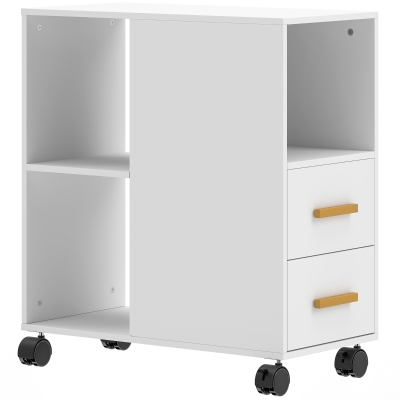
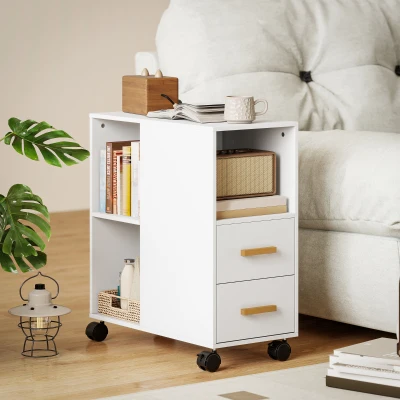
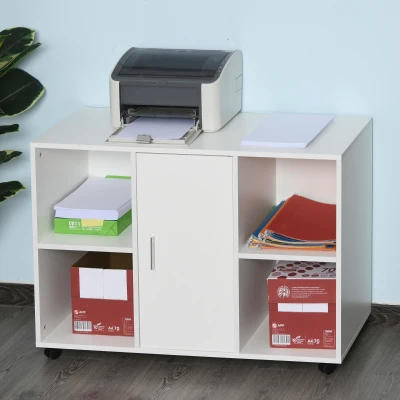
The Vinsetto Mobile Office File Cabinet perfectly embodies this approach. Its lateral design features an open compartment for quick-access items and a closed cupboard to conceal messy stationery, all mounted on smooth-rolling wheels. Because it is narrow enough to fit beside a desk or slide under a work surface, it effectively doubles your storage capacity without expanding your footprint. For those who frequently switch between sitting and standing positions, this mobility ensures your printing station is always within reach, regardless of how your workspace is configured.
Vertical Layering for Maximum Efficiency
When floor space is at a premium, the only direction left to build is upward. A well-designed printer trolley acts as a miniature vertical storage tower, compartmentalizing different categories of office supplies across multiple levels. The key is to assign each tier a specific function based on frequency of use and weight distribution.
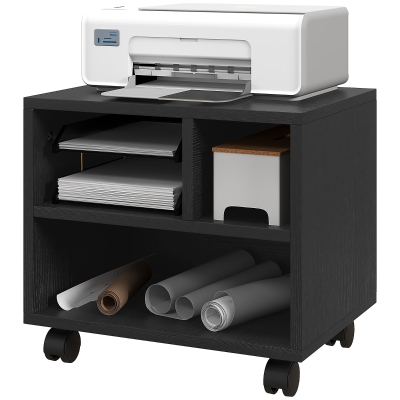
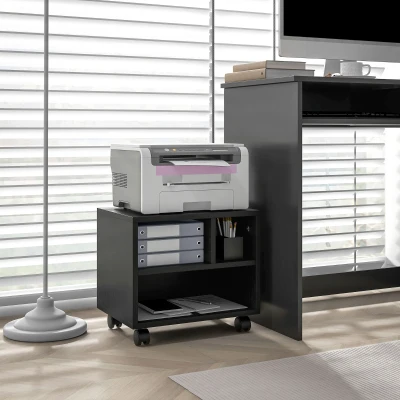
Consider the HOMCOM Printer Stand & Table with Adjustable Shelf. Its 60 x 30 x 65 cm frame is engineered to support heavy fax machines or scanners on the top surface, while the adjustable shelf below can be repositioned to accommodate towering stacks of A4 paper, envelopes, or bulky binders. This adjustability is crucial—it prevents wasted vertical space and allows the unit to adapt as your equipment or storage needs change. For a more enclosed solution, the HOMCOM Three-Compartment Printer Cabinet offers dedicated sections that keep different supplies separated. You might place the printer on top, use the middle compartments for current projects and reference materials, and reserve the lower section for bulk ink, toner, and archival files. This vertical segmentation keeps your workflow logical and your desk surface completely clear.
To help you choose the right configuration for your space, here is a comparison of three common space-utilization strategies:
| Solution | Footprint | Storage Capacity | Flexibility & Mobility |
|---|---|---|---|
| Mobile Printer & Storage Trolley | Ultra-compact (typically 30–40 cm depth) | High (multi-tier and enclosed compartments) | Excellent (rolls under desks, moves between rooms) |
| Standard Side Table / Desk Extension | Moderate (often 40–50 cm depth) | Low (single surface, no enclosed storage) | Poor (fixed location, difficult to move when loaded) |
| Fixed Filing Cabinet | Large (takes up permanent floor space) | Very High (but designed for files, not equipment) | None (cannot be relocated easily) |
The Mobile Workstation Concept
Beyond simple storage, a wheeled trolley fundamentally changes how you interact with your office equipment. It shifts the paradigm from a static "printer corner" to a dynamic "mobile printing hub." This is particularly useful in shared or hybrid workspaces where multiple users need occasional access to a scanner or label printer, or in homes where the office setup must be packed away at the end of the day.
Wheels also provide practical maintenance benefits. When a paper jam occurs or a toner cartridge needs replacing, you can simply roll the entire unit out into an open area with better lighting, rather than contorting yourself under a desk. Cleaning beneath and behind the trolley becomes effortless, preventing dust accumulation around sensitive electronics. The braking casters found on models like the HOMCOM Printer Stand lock securely in place during use, ensuring that the unit stays stable while you load paper or pull out heavy drawers. By treating your printer and supplies as a cohesive, mobile unit, you gain the freedom to reconfigure your workspace at a moment's notice—whether that means clearing the room for a video call, moving closer to a window for better ventilation, or simply rolling everything out of the way when the workday ends.
FAQ
Q1: How do I measure my under-desk clearance to ensure a printer trolley will fit?
Before purchasing a mobile trolley, measure the height from the floor to the lowest point of your desk's underside (not the top surface). A standard desk typically offers 60–65 cm of clearance, which is why many trolleys, like the HOMCOM Printer Stand & Table, are designed at 65 cm tall. However, be sure to account for the height of any casters, which can add 4–6 cm. If your clearance is tighter, look for low-profile trolleys or remove the wheels temporarily. Also measure the width and depth of the open space between your desk legs to ensure the trolley can slide in without obstruction. Always leave at least 2–3 cm of extra space for easy maneuverability.
Q2: Can the wheels support the weight of a heavy laser printer and a full ream of paper?
Quality office trolleys are built to handle substantial weight, but it is essential to check the specified load capacity. Most standard laser printers weigh between 10–20 kg, and a full ream of 500 sheets of A4 paper adds about 2.5 kg per pack. The Vinsetto Mobile Office File Cabinet and similar units typically support 20–30 kg per shelf or 50–60 kg overall. The casters are usually made of durable nylon or polyurethane, which roll smoothly without scratching floors. To ensure longevity, distribute the weight evenly across the shelves and avoid placing all heavy items on the top tier, which can make the trolley top-heavy and harder to steer.
Q3: How can I manage cables and prevent the trolley from rolling away when I'm using the printer?
Cable management is crucial in a compact space. Use adhesive cable clips or a small cable management box attached to the back of the trolley to bundle power cords and USB cables together, leaving enough slack for the unit to roll a short distance without unplugging. To prevent unwanted movement during use, always engage the locking brakes on the front casters. If your trolley lacks built-in brakes, you can purchase small rubber caster cups or wedges to place under the wheels. Additionally, keep the heaviest items (like paper reams) in the lower compartments to lower the center of gravity and improve stability while printing.